

HERM in Essential: the Higher Education Reference Model
The Higher Education Reference Model (HERM) is free in every edition of Essential. Load it, map your systems to its capabilities, and see your whole institution on one page: what you do, what supports it, what it costs and what is changing.
What is HERM?
The Higher Education Reference Model (HERM) is a free, standard set of business, application, data and technology architectures that describe how a higher education institution is organised and the information it uses. More than a thousand universities around the world use it.
HERM is curated by the HERM Working Group within the CAUDIT Enterprise Architecture Community of Practice, working with UCISA, EUNIS, EDUCAUSE and other higher education associations. It is published under the Creative Commons CC BY-NC-SA 4.0 licence.
HERM is made up of four models:
- Business Capability Model: what a university does, from curriculum design and student admission to research funding and estates management.
- Application Reference Model: the types of application that support those capabilities.
- Data Reference Model: the information a university creates and uses, such as students, staff, courses and research.
- Technology Reference Model: the technology that underpins it all, such as infrastructure, cybersecurity, digital identity and end-user computing.
Universities use HERM to describe the whole institution in a shared language, compare themselves with peers, plan digital transformation, and talk to executives and suppliers about change.
HERM and Essential
Essential includes HERM at no cost in both the open-source and commercial editions. EAS partnered with the HERM Working Group to make this possible, in line with HERM’s own free licence.
With HERM in Essential you get the reference models already structured in your repository, not as a static diagram. Every capability can be linked to the processes, applications, data, technology and projects that relate to it, so the model reflects your institution rather than a generic picture.
Use it as:
- A starter kit that gets your architecture practice going without building a capability model from scratch.
- A reference point for seeing where you match the sector and where you differ.
- A communication tool that explains the whole institution to colleagues, executives and partners in one view.
The Higher Education Reference Models help everybody using them to:
- Increase the value and efficiency of their architecture teams
- Describe a ‘whole of institution’ view to colleagues within their institution
- Facilitate the exchange of architectural knowledge and good practice in the sector
- Support interoperability and collaboration between member organisations
- Improve engagement with industry in major projects and initiatives
HERM In Essential
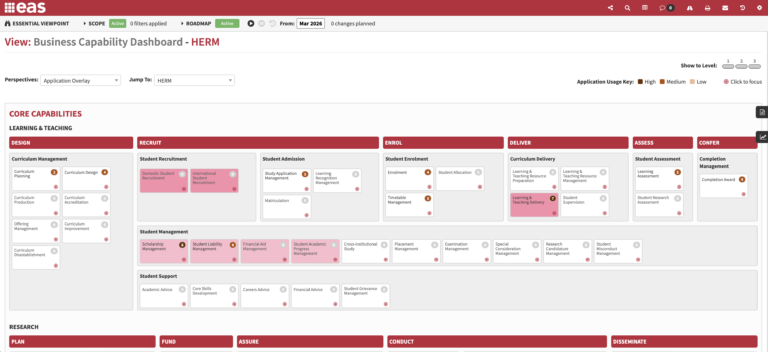
HERM Business Capability Model with Recipe Card Overlay
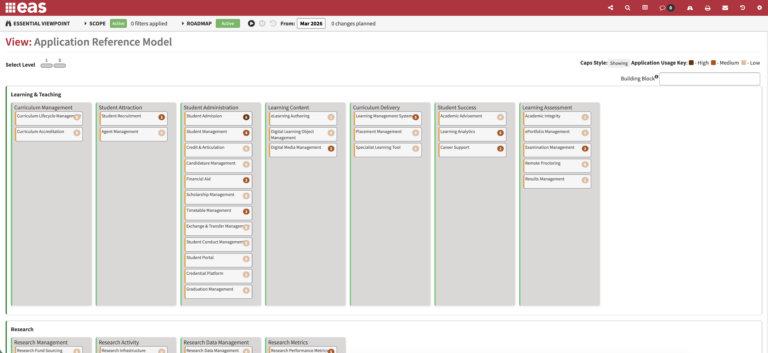
HERM Application Reference Model

HERM Data Reference Model
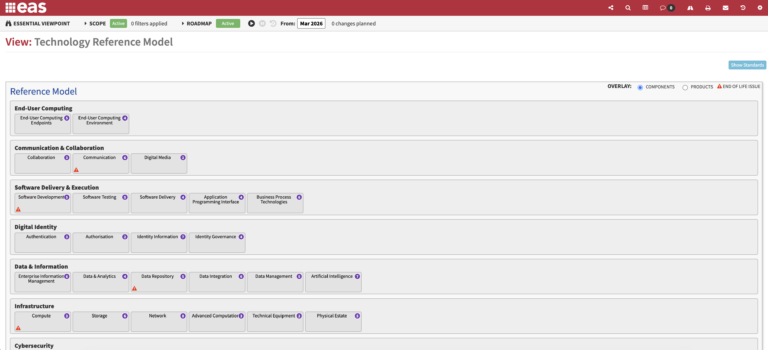
HERM Technology Reference Model

The HERM Portal: answers, not diagrams
The HERM Portal is a set of views in Essential that anyone in the university can use. Deans, IT directors, finance teams and project boards can open it and find answers without training.
See the whole university at a glance
The home page shows capability coverage, the number of applications in production, systems being retired, potential savings and active plans. A colour-coded HERM capability map shows where change is happening.
Every HERM capability, mapped to real systems
Browse the business, application, information and technology reference models. Each capability shows how many systems support it. Click one to see those systems, their lifecycle status and the plans that affect them.
Every system on a single page
Each application has one page showing what it does, its yearly cost, who looks after it, which HERM capabilities it supports, what it connects to and what is planned for it.
Savings opportunities, already worked out
Essential finds capabilities served by three or more systems, systems marked for retirement and capabilities with no system at all. It ranks them by potential saving so you know where to start.
From overlap to decision
Rationalisation views take you from a finding to a decision: capability heatmaps, application overlap maps, information authority, interface dependencies, and a quadrant that places every application by business fit, technical fit, cost and risk.
Keeping it current is easy
A capability model is only useful while it is up to date. The Map The University editors let the people who know the systems update them directly, with no specialist skills needed.
- Drag and drop mapping: drag an application onto a capability or process to map it, and choose the organisation that uses it.
- Categorisation: drag applications onto categories such as purpose, type and lifecycle status.
- Strategic timeline: drop a system onto a plan and say whether it is being enhanced, replaced or decommissioned, and when. Essential checks for conflicts with other plans.
- Spreadsheet editing: edit business processes, applications and technology products in a grid, or paste rows straight from Excel, then save to the repository.
Alternatively, integrations let you automate the updates from other systems.
Every change updates the HERM Portal views straight away.
The HERM Files
The version currently supported in Essential is v320, which includes the following:
HERMv320 Business Capability Model with Recipe Card overlay
HERM v320 Application Reference Model
HERM v320 Data Reference Model
HERM v320 Technology Reference Model
To find out more about the Higher Education Reference Models visit the CAUDIT website at https://caudit.edu.au/communities/caudit-higher-education-reference-models/ or the EDUCAUSE website at https://library.educause.edu/resources/2021/9/the-higher-education-reference-models.
Download the files here:
Existing Essential Users
Already have HERMv310 installed and want to update to HERMv320 – contact us
Already have Essential installed and want to add HERMv320, download the HERMv320 installation files.
New Users
If you are new to Essential and want to download the HERM v320 repository:
Download the HERM repository here: herm320baseline
Download new style Portal – unzip this and drop into the common folder in the web app
Portal Download:ev7_portal
To arrange a demo of HERM in Essential or to get the HERMv320 Launchpad contact us
Higher Education User Group
EAS are proud to co-host the Essential Higher Education User Group chaired by EAs from major universities in New York and Sydney. The aim of the group is to collaborate and explore various aspects of Enterprise Architecture (EA) in the context of higher education.
This interactive platform allows us to:
- Exchange thoughts on successful EA implementation
- Discuss strategies for enterprise architecture engagement within HE organisations
- Shape the product development of Essential.
Making HERM freely available in Essential was the outcome of one of our User Group sessions.
If you’re working in EA within higher education and want to be a part of our future sessions, contact us for more details. We vary meeting times to accommodate participants across different time zones across the globe.